

HCVA0-003 by HashiCorp Actual Free Exam Questions And Answers [UPDATED 2026]
HCVA0-003 Questions Truly Valid For Your HashiCorp Exam!
NEW QUESTION # 164
Which of the following describes usage of an identity group?
- A. Consistently apply the same set of policies to a collection of entities
- B. When they want to revoke the credentials for a whole set of entities simultaneously
- C. Limit the policies that would otherwise apply to an entity in the group
- D. Audit token usage
Answer: A
Explanation:
An identity group is a collection of entities that share some common attributes. An identity group can have one or more policies attached to it, which are inherited by all the members of the group. An identity group can also have subgroups, which can further refine the policies and attributes for a subset of entities.
One of the use cases of an identity group is to consistently apply the same set of policies to a collection of entities. For example, an organization may have different teams or departments, such as engineering, sales, or marketing. Each team may have its own identity group, with policies that grant access to the secrets and resources that are relevant to their work. By creating an identity group for each team, the organization can ensure that the entities belonging to each team have the same level of access and permissions, regardless of which authentication method they use to log in to Vault. References: Identity: entities and groups | Vault | HashiCorp Developer, vault_identity_group | Resources | hashicorp/vault | Terraform | Terraform Registry
NEW QUESTION # 165
According to the screenshot below, what auth method did this client use to log in to Vault?
(Screenshot shows a lease path: auth/userpass/login/student01)
- A. Root token
- B. Userpass
- C. Child token
- D. Auth
Answer: B
Explanation:
Comprehensive and Detailed in Depth Explanation:
The screenshot provides a lease path: auth/userpass/login/student01, which reveals the authentication method used to generate the token tied to this lease. Vault's auth methods create tokens at specific paths, and the path structure indicates the method.
* Option A: UserpassThe path auth/userpass/login/student01 explicitly includes userpass, matching the userpass auth method. This method authenticates users with a username (e.g., student01) and password, typically via vault login -method=userpass username=student01. The /login endpoint confirms a login operation, and the lease ties to the resulting token. This is the clear, correct answer based on the path.
Correct.Vault Docs Insight:"The userpass auth method allows users to authenticate with a username and password... mounted at auth/userpass by default." (Matches the path.)
* Option B: Auth"Auth" isn't an auth method-it's the namespace prefix (auth/) for all auth methods in Vault (e.g., auth/token, auth/userpass). The screenshot specifies userpass within auth/, not a generic
"auth" method. This option is a misnomer and incorrect.Vault Docs Insight:"All auth methods are mounted under auth/... 'auth' itself is not a method." (Clarifies structure.)
* Option C: Root tokenA root token is a privileged token type, not an auth method. It's created during Vault initialization or via auth/token/create with root privileges, not through a login path like auth
/userpass/login. The screenshot's path indicates a userpass login, not a root token usage. Incorrect.
Vault Docs Insight:"Root tokens are created at initialization... not tied to a specific auth method login path." (Distinct from userpass.)
* Option D: Child tokenA child token is a token created by a parent token (e.g., via vault token create), not an auth method. The path auth/userpass/login/student01 shows a login event, not a token creation event (which would be auth/token/create). This option confuses token hierarchy with authentication.
Incorrect.Vault Docs Insight:"Child tokens are created by parent tokens... not directly via login endpoints." (Different mechanism.) Detailed Mechanics:
When a user logs in with vault login -method=userpass -path=userpass username=student01, Vault hits the endpoint POST /v1/auth/userpass/login/student01 with a password payload. Success generates a token, and a lease is created at auth/userpass/login/student01 with a TTL. The screenshot's lease path directly reflects this process, pinpointing userpass as the method.
Real-World Example:
Enable userpass: vault auth enable userpass. Add user: vault write auth/userpass/users/student01 password=secret. Login: vault login -method=userpass username=student01. The token's lease appears as auth
/userpass/login/student01.
Overall Explanation from Vault Docs:
"The lease shown lives at auth/userpass/login/<username> and indicates the userpass auth method was used to obtain a token... The userpass method authenticates via username/password at its mount path." The path structure is a definitive indicator.
Reference:https://developer.hashicorp.com/vault/docs/auth/userpass
NEW QUESTION # 166
Your organization uses a CI/CD pipeline to deploy its applications on Azure. During testing, you generate new credentials to validate Vault can create new credentials. The result of this command is below:
text
CollapseWrapCopy
$ vault read azure/creds/bryan-krausen
Key Value
--- -----
lease_id azure/creds/bryan-krausen/9eed0373-ca92-99b6-b914-779b7bb0e1d9 lease_duration 60m lease_renewable true client_id 532bf678-ee4e-6be1-116b-4e4221e445dd client_secret be60395b-4e6b-2b7e-a4b3-c449a5c00973 What commands can be used to revoke this secret after you have finished testing? (Select three)
- A. vault lease revoke -prefix azure/creds/bryan-krausen
- B. vault lease revoke azure/creds/bryan-krausen/9eed0373-ca92-99b6-b914-779b7bb0e1d9
- C. vault lease revoke -prefix azure/
- D. vault lease revoke azure/creds/bryan-krausen
- E. vault lease revoke azure/
Answer: A,B,C
Explanation:
Comprehensive and Detailed In-Depth Explanation:
Dynamic credentials are tracked by leases, revocable via vault lease revoke. The Vault documentation states:
"The vault lease revoke command is used to revoke a lease/secret created by a Vault secrets engine. Each lease that is created is tracked using a unique lease ID, which can be used to renew or revoke a lease.
* You can revoke an individual lease using the command vault lease revoke <lease_id>
* You can also revoke ALL leases from a secrets engine using the -prefix flag, such as vault lease revoke - prefix azure/
* You can also revoke leases created from a specific role by using the -prefix flag but specifying the path all the way to the role like this: vault lease revoke -prefix azure/creds/<role_name>"-Vault Commands: lease revoke
* B: Correct. vault lease revoke -prefix azure/ revokes all leases under azure/.
* C: Correct. vault lease revoke azure/creds/bryan-krausen/9eed0373-ca92-99b6-b914-779b7bb0e1d9 targets the specific lease ID.
* E: Correct. vault lease revoke -prefix azure/creds/bryan-krausen revokes all leases for that role.
* A: Incorrect; lacks the -prefix flag, making it invalid syntax.
* D: Incorrect; lacks the -prefix flag and isn't a full lease ID.
References:
Vault Commands: lease revoke
NEW QUESTION # 167
Which of the following policies would permit a user to generate dynamic credentials on a database?
- A. path "database/creds/read_only_role" { capabilities = ["update"] }
- B. path "database/creds/read_only_role" { capabilities = ["read"] }
- C. path "database/creds/read_only_role" { capabilities = ["generate"] }
- D. path "database/creds/read_only_role" { capabilities = ["list"] }
Answer: B
Explanation:
Comprehensive and Detailed in Depth Explanation:
The Database secrets engine generates dynamic credentials for database access. The endpoint database/creds
/<role> (e.g., read_only_role) provides these credentials via a read operation. Let's analyze:
* Option A: capabilities = ["generate"]There's no generate capability in Vault policies. Capabilities are create, read, update, delete, list, etc. This is invalid. Incorrect.
* Option B: capabilities = ["update"]update (PUT) modifies existing data, not generates credentials.
The creds endpoint uses GET. Incorrect.
* Option C: capabilities = ["list"]list retrieves metadata or paths, not credential data. Incorrect.
* Option D: capabilities = ["read"]Generating dynamic credentials involves a GET request to database
/creds/<role>, mapped to the read capability. This policy allows it. Correct.
Detailed Mechanics:
For a role read_only_role defined with vault write database/roles/read_only_role db_name=my-db creation_statements="CREATE USER...", a user with read on database/creds/read_only_role can run vault read database/creds/read_only_role to get temporary credentials. Vault's policy system aligns HTTP verbs to capabilities: GET = read, PUT = update. This counterintuitive mapping (GET for creation) is specific to dynamic secrets.
Overall Explanation from Vault Docs:
"Generating database credentials requires read capability on database/creds/<role>... Despite creating credentials, the HTTP request is a GET." Reference:https://developer.hashicorp.com/vault/tutorials/db-credentials/database-secrets
NEW QUESTION # 168
You are deploying Vault in a local data center, but want to be sure you have a secondary Vault cluster in the event the primary cluster goes offline. In the secondary data center, you have applications that are running, as they are architected to run active/active. Which type of replication would be best in this scenario?
- A. Performance replication
- B. Disaster Recovery replication
Answer: A
Explanation:
Comprehensive and Detailed in Depth Explanation:
Vault supports two replication types:Performance ReplicationandDisaster Recovery (DR) Replication, each serving distinct purposes. The scenario involves an on-premises primary cluster and a secondary cluster in another data center, with active/active applications needing Vault access. Let's analyze:
* Option A: Disaster Recovery replicationDR replication mirrors the primary cluster's state (secrets, tokens, leases) to a secondary cluster, which remains in standby mode until activated (promoted) during a failover. It's designed for disaster scenarios where the primary is lost, not for active/active use. The secondary doesn't serve reads or writes until promoted, which doesn't suit applications actively running in the secondary data center. Incorrect.
* Option B: Performance replicationPerformance replication creates an active secondary cluster that replicates data from the primary in near real-time. It supports read operations locally, reducing latency for applications in the secondary data center, and can handle writes (forwarded to the primary). This fits an active/active architecture, providing redundancy and performance. If the primary fails, the secondary can continue serving reads (though writes need reconfiguring). Correct.
Detailed Mechanics:
Performance replication uses a primary-secondary model with log shipping via Write-Ahead Logs (WALs).
The secondary maintains its own storage, synced from the primary, and can serve reads independently. Writes are forwarded to the primary, ensuring consistency. In an active/active setup, applications in both data centers can query their local Vault cluster, leveraging the secondary's read capability. DR replication, conversely, keeps the secondary dormant, requiring manual promotion,which introduces downtime unsuitable for active apps.
Real-World Example:
Primary cluster at dc1.vault.local:8200, secondary at dc2.vault.local:8200. Apps in DC2 query the secondary for secrets (e.g., GET /v1/secret/data/my-secret), avoiding cross-DC latency. If DC1 fails, DC2 continues serving cached reads until a new primary is established.
Overall Explanation from Vault Docs:
"Performance replication... allows secondary clusters to serve reads locally, ideal for active/active setups...
DR replication is for failover, keeping secondaries in standby."
Reference:https://developer.hashicorp.com/vault/docs/enterprise/replication
NEW QUESTION # 169
What is the primary role of the Vault Security Operator (VSO) in a Kubernetes environment?
- A. Managing Vault server deployments and auto-scaling Vault instances in Kubernetes
- B. Enforcing Kubernetes network policies for Vault communication
- C. Replacing Kubernetes Secrets with a built-in alternative that does not require Vault
- D. Automating the injection and lifecycle management of Vault secrets for Kubernetes workloads
Answer: D
Explanation:
Comprehensive and Detailed In-Depth Explanation:
The VSO automates secret management in Kubernetes. The Vault documentation states:
"The Vault Security Operator (VSO) is designed to streamline the integration of Vault with Kubernetes by automating the retrieval, injection, and lifecycle management of secrets for workloads running in a Kubernetes cluster. It enables Kubernetes applications to securely consume Vault secrets without requiring direct interaction with Vault, improving security and operational efficiency."
-Vault Security Operator
* C: Correct.
"Automating the injection and lifecycle management of Vault secrets for Kubernetes workloads."
-Vault Security Operator
* A: Server management is not VSO's role.
* B: Network policies are separate.
* D: VSO enhances, doesn't replace, Kubernetes Secrets.
References:
Vault Security Operator
NEW QUESTION # 170
By default, what methods of authentication does Vault support? (Select four)
- A. JWT
- B. LDAP
- C. Kubernetes
- D. AppRole
- E. SSH
- F. VMware
Answer: A,B,C,D
Explanation:
Comprehensive and Detailed In-Depth Explanation:
Vault supports multiple auth methods by default. The Vault documentation states:
"Auth methods are the components in Vault that perform authentication and are responsible for assigning identity and a set of policies to a user. Available auth methods include AppRole, JWT/OIDC, Kubernetes, LDAP, and more."
-Vault Auth Methods
* B: Kubernetes is supported:
"Kubernetes authentication method in Vault allows Kubernetes service accounts to authenticate with Vault."
-Vault Auth: Kubernetes
* D: LDAP is supported:
"LDAP authentication method allows users to authenticate against an LDAP directory."
-Vault Auth: LDAP
* E: AppRole is supported:
"AppRole authentication method in Vault allows machines or applications to authenticate with Vault."
-Vault Auth: AppRole
* F: JWT is supported:
"JWT authentication method in Vault allows users to authenticate using JSON Web Tokens (JWT)."
-Vault Auth: JWT
* A: SSH is a secrets engine, not an auth method.
* C: VMware is not a default auth method.
References:
Vault Auth Methods
NEW QUESTION # 171
How many Shamir's key shares are required to unseal a Vault instance?
- A. All key shares
- B. A quorum of key shares
- C. One or more keys
- D. The threshold number of key shares
Answer: D
Explanation:
Shamir's Secret Sharing is a cryptographic algorithm that allows a secret to be split into multiple parts, called key shares, such that a certain number of key shares are required to reconstruct the secret. The number of key shares and the threshold number are configurable parameters that depend on the desired level of security and availability. Vault uses Shamir's Secret Sharing to protect its master key, which is used to encrypt and decrypt the data encryption key that secures the Vault data. When Vault is initialized, it generates a master key and splits it into a configured number of key shares, which are then distributed to trusted operators. To unseal Vault, the threshold number of key shares must be provided to reconstruct the master key and decrypt the data encryption key. This process ensures that no single operator can access the Vault data without the cooperation of other key holders. References: https://developer.hashicorp.com/vault/docs/concepts/seal4, https://developer.
hashicorp.com/vault/docs/commands/operator/init5, https://developer.hashicorp.com/vault/docs/commands
/operator/unseal6
NEW QUESTION # 172
In regards to the Transit secrets engine, which of the following is true given the following command and output (select three):
$ vault write encryption/encrypt/creditcard plaintext=$(base64 < < < " 1234 5678 9101 1121 " ) Key: ciphertext Value: vault:v3:cZNHVx+sxdMErXRSuDa1q
/pz49fXTn1PScKfhf+PIZPvy8xKfkytpwKcbC0fF2U=
- A. The Transit secrets engine is mounted at the encryption path
- B. The name of the keyring used to encrypt the data is creditcard
- C. There are at least three data keys associated with this keyring
- D. The data was written to the encryption path, which is provided by default when enabling the Transit secrets engine
Answer: A,B,C
Explanation:
Comprehensive and Detailed in Depth Explanation:
* A: The command uses encryption/encrypt/creditcard, indicating the Transit engine is mounted at encryption/. Correct.
* B: The endpoint creditcard specifies the key name used for encryption. Correct.
* C: The output vault:v3: shows key version 3, implying at least three versions (v1, v2, v3) after rotations. Correct.
* D: The default path for Transit is transit/, not encryption/. This is a custom mount, not default. Incorrect.
Overall Explanation from Vault Docs:
"The Transit engine encrypts data at a specified key name... Key versions (e.g., v3) indicate rotations." Reference: https://developer.hashicorp.com/vault/docs/secrets/transit
NEW QUESTION # 173
You are using Azure Key Vault for the auto-unseal configuration on your cluster. After the Vault service restarts, what command must you run to unseal Vault?
- A. vault operator init
- B. You don't need to run a command when using auto-unseal
- C. vault operator unseal
- D. vault operator members
Answer: B
Explanation:
Comprehensive and Detailed in Depth Explanation:
When using Azure Key Vault for auto-unseal, no manual command is required to unseal Vault after a service restart. The HashiCorp Vault documentation states: "Vault supports opt-in automatic unsealing via cloud technologies: AliCloud KMS, AWS KMS, Azure Key Vault, Google Cloud KMS, and OCI KMS. This feature enables operators to delegate the unsealing process to trusted cloud providers to ease operations in the event of partial failure and to aid in the creation of new or ephemeral clusters." Specifically, for Azure Key Vault, "the auto-unseal feature automatically handles the unsealing process," eliminating the need for manual intervention.
The documentation further explains: "When configured with auto-unseal, Vault will automatically unseal itself upon startup using the configured key management service, provided the necessary permissions and credentials are in place." Options likevault operator unsealare for manual unsealing,vault operator memberslists cluster members, andvault operator initinitializes Vault-none apply to auto-unseal scenarios.
Thus, A is correct.
Reference:
HashiCorp Vault Documentation - Auto Unseal with Azure Key Vault
HashiCorp Vault Documentation - Seal Concepts: Auto Unseal
NEW QUESTION # 174
Without logging into another interface, what feature can Chad use to execute a simple CLI command to enable a new secrets engine?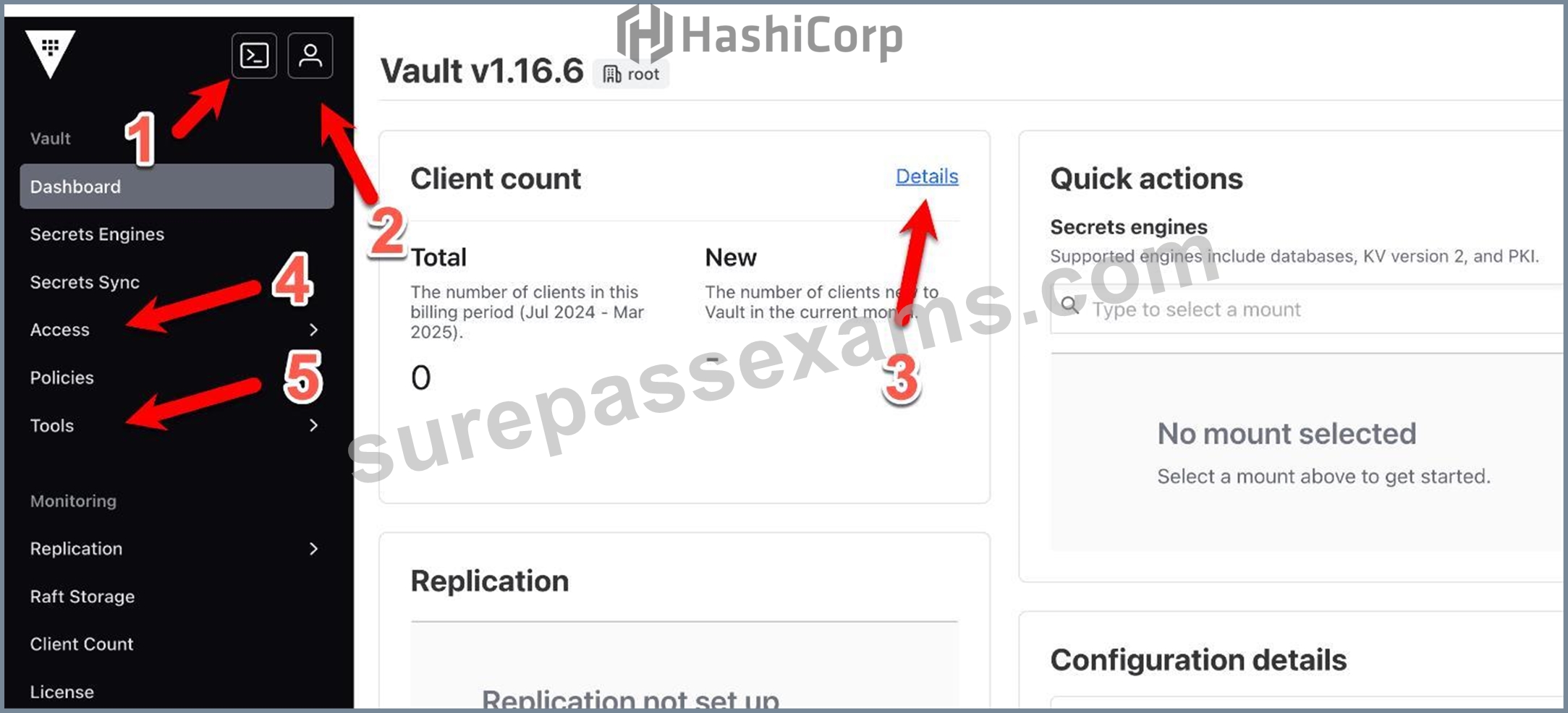
- A. Client count details (Feature 3)
- B. Access management link (Feature 4)
- C. CLI emulation in the Vault UI (Feature 1)
- D. User information button (Feature 2)
Answer: C
Explanation:
Comprehensive and Detailed in Depth Explanation:
The Vault UI includes a feature allowing CLI commands to be executed directly within the interface, known as the CLI emulation or REPL (Read-Eval-Print Loop) terminal. The HashiCorp Vault documentation states:
"The Vault GUI includes an advanced mode that uses a read-eval-print loop (REPL) terminal to mimic basic create/read/update/delete/list (CRUDL) commands for users who are more familiar with the Vault CLI than the GUI." This feature enables Chad to run a command like vault secrets enable <engine> without switching to a separate CLI, fulfilling the requirement.
The documentation under "Explore the Vault UI" adds: "This terminal allows users to execute Vault CLI commands directly from the web interface, enhancing usability for those accustomed to CLI workflows." Options like user information (B), client count details (C), and access management (D) do not provide CLI execution capabilities. Thus, A is correct.
Reference:
HashiCorp Vault Documentation - Getting Started UI: Explore the Vault UI
NEW QUESTION # 175
Which of the following best describes the function of the Vault Secrets Operator in a Kubernetes environment?
- A. It continuously reconciles and synchronizes secrets from Vault to Kubernetes, ensuring secrets are always updated
- B. It is a standalone Vault server that automatically applies security policies and rotates root tokens.
- C. It provides an interface to dynamically provision Kubernetes clusters through Vault's infrastructure secrets.
- D. It replaces the Kubernetes secrets API entirely and operates purely as a certificate authority for all workloads.
Answer: A
Explanation:
Comprehensive and Detailed in Depth Explanation:
The Vault Secrets Operator (VSO) enhances secrets management in Kubernetes. The HashiCorp Vault documentation states: "The Vault Secrets Operator operates by watching for changes to itssupported set of Custom Resource Definitions (CRD). Each CRD provides the specification required to allow the operator to synchronize from one of the supported sources for secrets to a Kubernetes Secret. The operator writes the source secret data directly to the destination Kubernetes Secret, ensuring that any changes made to the source are replicated to the destination over its lifetime." It further explains: "In this way, an application only needs to have access to the destination secret in order to make use of the secret data contained within." This aligns withC: "It continuously reconciles and synchronizes secrets from Vault to Kubernetes, ensuring secrets are always updated." Option A is false-it augments, not replaces, the Kubernetes Secrets API and isn't a CA. Option B is incorrect-it's not a Vault server but an operator. Option D is wrong-it syncs secrets, not provisions clusters. Thus, C is correct.
Reference:
HashiCorp Vault Documentation - Vault Secrets Operator
NEW QUESTION # 176
What could you do with the feature found in the screenshot below (select two)?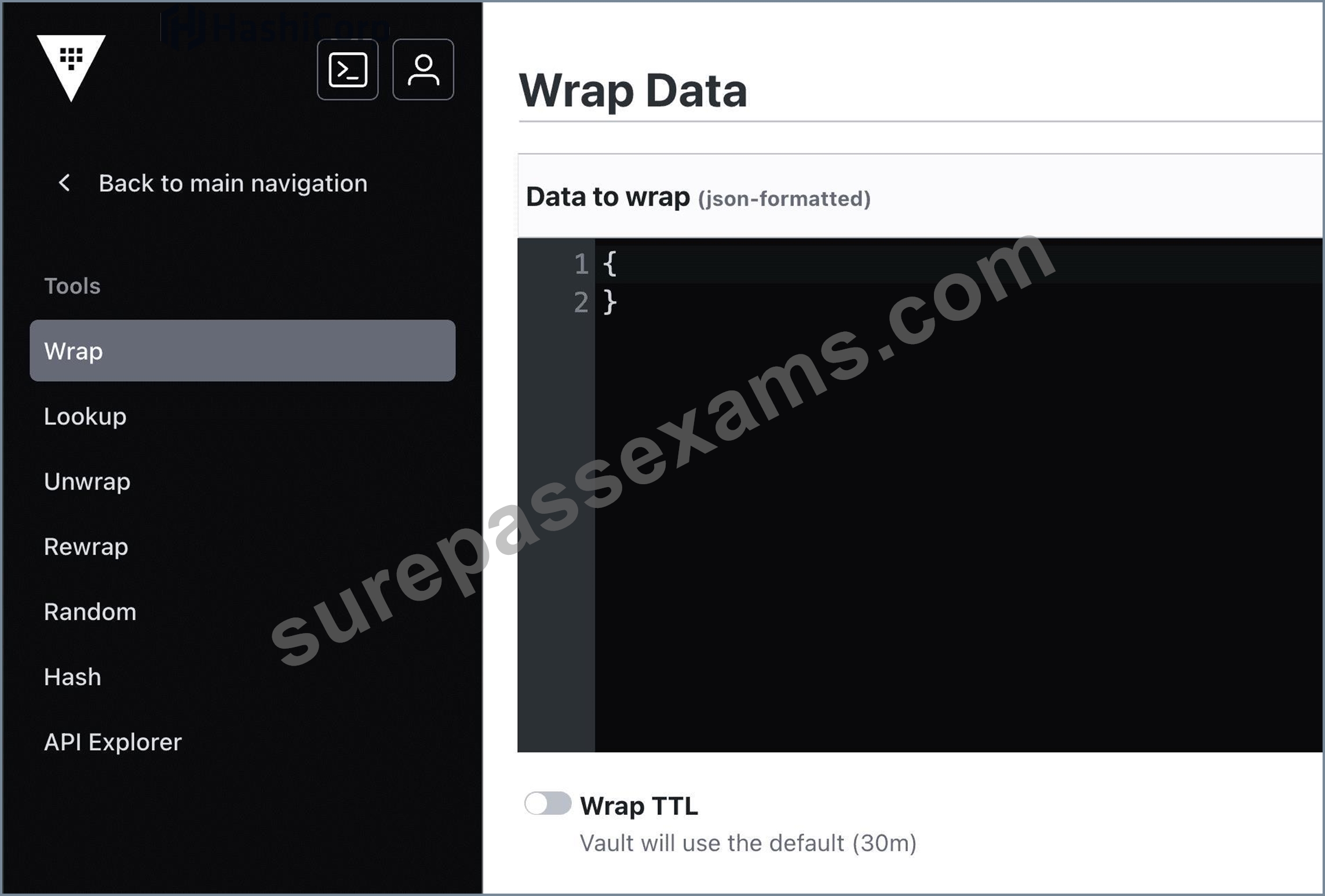
- A. Encrypt sensitive data to send to a colleague over email
- B. Encrypt the Vault master key that is stored in memory
- C. Using a short TTL, you could encrypt data in order to place only the encrypted data in Vault
- D. Use response-wrapping to protect data
Answer: A,D
Explanation:
Comprehensive and Detailed in Depth Explanation:
The screenshot highlights Vault's response wrapping feature, accessible via the UI's "Wrap" option. This feature wraps a Vault response (e.g., a secret or token) in a single-use token with a configurable TTL, ensuring secure delivery to an intended recipient. Let's evaluate each option against this capability:
* Option A: Using a short TTL, you could encrypt data in order to place only the encrypted data in Vault This misinterprets response wrapping. Wrapping doesn't encrypt data for storage in Vault; it secures a response for transmission outside Vault. Encryption for storage would involve the Transit secrets engine, not wrapping. The TTL in wrapping limits the wrapped token's validity, not the data's encryption lifecycle. This option conflates two unrelated features and is incorrect. Vault Docs Insight:
"Response wrapping does not store data in Vault; it delivers it securely to a recipient." (No direct storage implication.)
* Option B: Encrypt the Vault master key that is stored in memory The master key in Vault is already encrypted at rest (in storage) and decrypted in memory during operation using the unseal process (e.g., Shamir shares or auto-unseal). Response wrapping doesn't interact with the master key- it's a client-facing feature for secret delivery, not an internal encryption mechanism. This is a fundamental misunderstanding of Vault's architecture and wrapping's purpose. Incorrect. Vault Docs Insight: "The master key is managed by the seal mechanism, not client-facing features like wrapping." (See seal/unseal docs.)
* Option C: Encrypt sensitive data to send to a colleague over email This aligns perfectly with response wrapping. You can retrieve a secret (e.g., vault read secret/data/my-secret), wrap it with a short TTL (e.g., 5 minutes), and receive a token (e.g., hvs. < token > ). You email this token to a colleague, who unwraps it with vault unwrap < token > to access the secret. The data is encrypted within the token, secure during transit, and expires after the TTL. This is a textbook use case for wrapping. Correct. Vault Docs Insight: "Response wrapping... can be used to securely send sensitive data to another party, such as over email, with a limited lifetime." (Directly supported use case.)
* Option D: Use response-wrapping to protect data This is the essence of the feature. Wrapping protects data by encapsulating it in a single-use token, accessible only via an unwrap operation. For example, vault write -wrap-ttl=60s secret/data/my-secret returns a wrapped token, protecting the secret until unwrapped. This ensures confidentiality and controlled access, making it a core benefit of the feature. Correct. Vault Docs Insight: "Vault can wrap a response in a single-use token... protecting the data until unwrapped by the recipient." (Core definition.) Detailed Mechanics:
Response wrapping works by taking a Vault API response (e.g., a secret's JSON payload) and storing it in the cubbyhole secrets engine under a newly generated single-use token. The token's TTL (e.g., 60s) limits its validity. The API call POST /v1/sys/wrapping/wrap with a payload (e.g., { " ttl " : " 60s " , " data " : { " key ": " value " }}) returns { " wrap_info " : { " token " : " hvs. < token > " }}. The recipient uses vault unwrap hvs. < token > (or POST /v1/sys/wrapping/unwrap) to retrieve the original data. Once unwrapped, the token is revoked, ensuring one-time use. This leverages Vault's encryption and token system for secure data exchange.
Real-World Example:
You generate an API key in Vault: vault write secret/data/api key=abc123. In the UI, you click "Wrap" with a
5-minute TTL, getting hvs.XYZ. You email hvs.XYZ to a colleague, who runs vault unwrap hvs.XYZ within
5 minutes to get key=abc123. After unwrapping, the token is invalid, and the secret is safe from interception.
Overall Explanation from Vault Docs:
"Vault includes a feature called response wrapping. When requested, Vault can take the response it would have sent to an HTTP client and instead insert it into the cubbyhole of a single-use token, returning that token instead... This is useful for securely delivering sensitive data." The feature excels at protecting data in transit (e.g., email) and enforcing one-time access, not internal key management or storage encryption.
Reference: https://developer.hashicorp.com/vault/docs/concepts/response-wrapping Additional Reference:
https://developer.hashicorp.com/vault/docs/secrets/cubbyhole
NEW QUESTION # 177
A web application uses Vault's transit secrets engine to encrypt data in-transit. If an attacker intercepts the data in transit which of the following statements are true? Choose two correct answers.
- A. The Vault administrator would need to seal the Vault server immediately
- B. You can rotate the encryption key so that the attacker won't be able to decrypt the data
- C. The keys can be rotated and min_decryption_version moved forward to ensure this data cannot be decrypted
- D. Even if the attacker was able to access the raw data, they would only have encrypted bits (TLS in transit)
Answer: C,D
Explanation:
A web application that uses Vault's transit secrets engine to encrypt data in-transit can benefit from the following security features:
* Even if the attacker was able to access the raw data, they would only have encrypted bits (TLS in transit). This means that the attacker would need to obtain the encryption key from Vault in order to decrypt the data, which is protected by Vault's authentication and authorization mechanisms. The transit secrets engine does not store the data sent to it, so the attacker cannot access the data from Vault either.
* The keys can be rotated and min_decryption_version moved forward to ensure this data cannot be decrypted. This means that the web application can periodically change the encryption key used to encrypt the data, and set a minimum decryption version for the key, which prevents older versions of the key from being used to decrypt the data. This way, even if the attacker somehow obtained an old version of the key, they would not be able to decrypt the data that was encrypted with a newer version of the key.
The other statements are not true, because:
* You cannot rotate the encryption key so that the attacker won't be able to decrypt the data. Rotating the key alone does not prevent the attacker from decrypting the data, as they may still have access to the old version of the key that was used to encrypt the data. You need to also move the min_decryption_version forward to invalidate the old version of the key.
* The Vault administrator would not need to seal the Vault server immediately. Sealing the Vault server would make it inaccessible to both the attacker and the legitimate users, and would require unsealing it with the unseal keys or the recovery keys. Sealing the Vault server is a last resort option in case of a severe compromise or emergency, and is not necessary in this scenario, as the attacker does not have access to the encryption key or the data in Vault. References: Transit - Secrets Engines | Vault | HashiCorp Developer, Encryption as a service: transit secrets engine | Vault | HashiCorp Developer
NEW QUESTION # 178
What header must be included in an API request in order to provide authentication validation?
- A. X-Vault-Token
- B. X-Token-Creds
- C. X-Token-Vault
- D. X-Vault-Creds
Answer: A
Explanation:
Comprehensive and Detailed In-Depth Explanation:
For Vault API authentication:
* B. X-Vault-Token : " The token for authentication is set directly as a header for the HTTP API. The header should be either X-Vault-Token: < token > or Authorization: Bearer < token > . " This header carries the client token required to validate the request's authenticity and permissions.
* Incorrect Options :
* A. X-Token-Vault : Incorrect naming convention. " Does not follow the standard naming conventions. "
* C. X-Token-Creds : Not recognized by Vault. " Does not align with standard authentication headers. "
* D. X-Vault-Creds : Invalid for authentication. " Does not correspond to the standard mechanism.
"
The X-Vault-Token header is critical for secure API interactions.
Reference: https://developer.hashicorp.com/vault/docs/auth/token#authentication
NEW QUESTION # 179
You are planning the deployment of your first Vault cluster and have decided to use Integrated Storage as the storage backend. Where do you configure the storage backend to be used by Vault?
- A. In the systemd service file
- B. Inside the Vault service once Vault is up and running
- C. In the Vault configuration file
- D. In the Vault Agent sink file
Answer: C
Explanation:
Comprehensive and Detailed In-Depth Explanation:
The storage backend is configured in the Vault configuration file. The Vault documentation states:
"The Vault configuration file includes different stanzas and parameters to define a variety of configuration options. These configurations include the storage backend, listener, TLS certificates, seal type, cluster name, log level, UI, cluster IP address, and a few more. Most of these are required to get Vault up and running in the first place, so they must be placed in the configuration file."
-Vault Configuration
* C: Correct. For Integrated Storage:
"Configuring the storage backend to be used by Vault is done in the Vault configuration file."
-Vault Configuration: Raft Storage
* A: systemd manages the service, not storage.
* B: Backend must be set before running.
* D: Agent sink is for client tokens.
References:
Vault Configuration
Vault Configuration: Raft Storage
NEW QUESTION # 180
Vault enables the generation of dynamic credentials against many different platforms. When generating these credentials, what Vault feature is used to track the credentials?
- A. role
- B. token
- C. lease_id
- D. namespace
Answer: C
Explanation:
Comprehensive and Detailed In-Depth Explanation:
Dynamic credentials are tracked via leases. The Vault documentation states:
"With every dynamic secret and service type authentication token, Vault creates a lease. A lease is metadata containing information such as time duration, renewability, and more. Vault promises that the data will be valid for the given period, or Time To Live (TTL). The lease_id is a unique identifier assigned to each dynamically generated credential by Vault."
-Vault Concepts: Leases
* D: Correct. lease_id tracks credential lifecycle:
"It is used to track the lifecycle of the credential, including its creation, renewal, and revocation."
-Vault Concepts: Leases
* A: Namespaces organize, not track.
* B: Roles define generation, not tracking.
* C: Tokens authenticate, not track credentials.
References:
Vault Concepts: Leases
NEW QUESTION # 181
......
Get instant access of 100% real exam questions with verified answers: https://www.surepassexams.com/HCVA0-003-exam-bootcamp.html
HCVA0-003 Actual Questions - Instant Download Tests Free Updated Today!: https://drive.google.com/open?id=1lA066yS5iJy0w_-DcHS5aGeQ1PQDwoHu